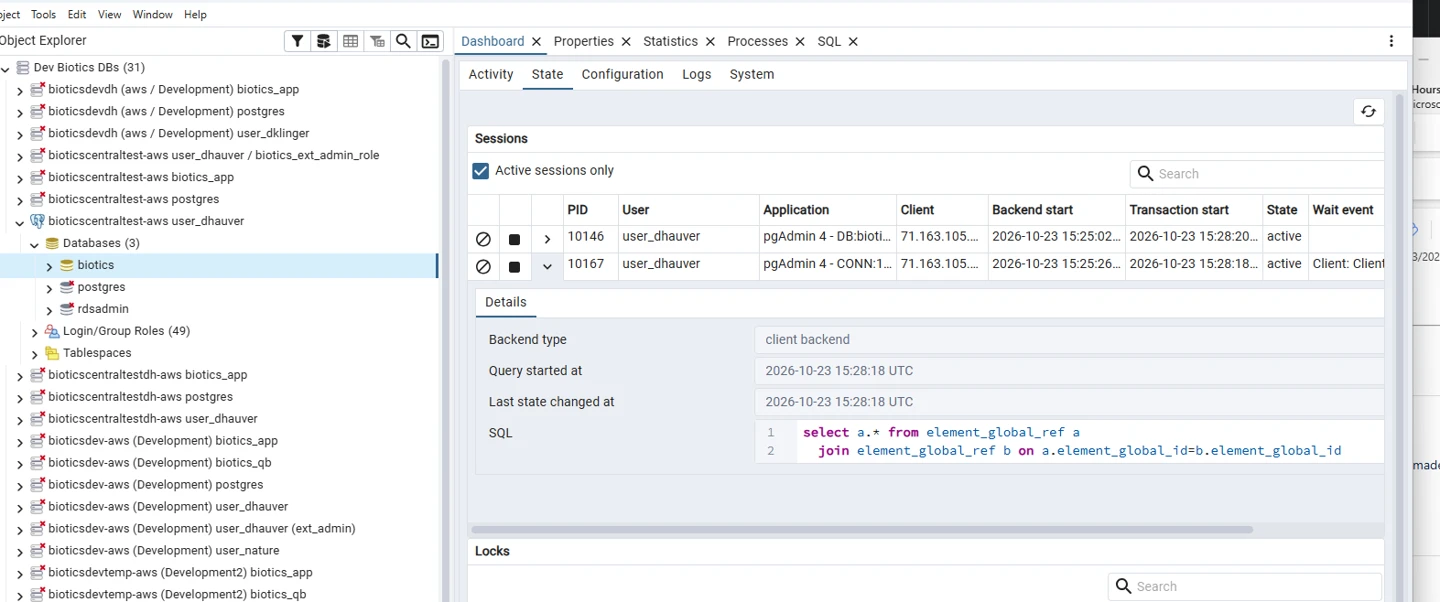
PROBLEM:
The following error occurs if trying to cancel a query when connected to the database via a user assigned the Role:biotics_ext_admin_role.

This is a pgAdmin bug, but they’re not planning to fix it. pgAdmin can't cancel query when role field is filled in connection settings · Issue #7442 · pgadmin-org/pgadmin4
The issue is that the identity used to log in (user_xxx) must be used to cancel the query, but pgAdmin is sending the request using the assumed role (biotics_ext_admin_role).
SOLUTION:
- Open a second connection that doesn’t set the Role as
biotics_ext_admin_role. - Open the default workspace view
- Open the dashboard
- Switch to the State tab.
- Filter to active sessions
- Use “search” to filter to your user account if there are a lot.
- Find the session running the problematic query.
- Use the stop button to cancel the query.