
In Biotics5 Query Builder, tables and views were listed in the left pane without anything in front of the table name, sorted by table name.
But in Biotics6, the table and view names are preceded by the schema they're in, and sorted by schema (but not alphabetically, see table below), then table name. They are also shown in lower case, which is the Postgres standard.
| Biotics5 | Biotics6 |
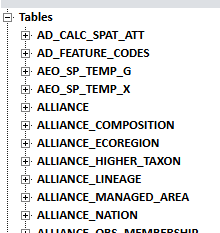 | 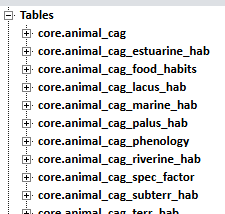 |
This is because in Biotics5 we had only 1 schema for tables and views ("biotics_user" or "hdms"), while in Biotics6 tables are organized in multiple schemas as recommended for security handling in Postgres.
Schemas visible in Query Builder in Biotics6, in Query Builder sort order
| schema | contains |
| core | Core tables (such as element_global) that hold user-entered data and are not of the types listed below, plus standard views |
| domain | Standard domain tables (options that are available as choices within dropdown lists) and views |
| wl | Working List tables |
| ext | Extensible tables (including extensible domain tables) and non-standard views, which are specific to the database instance. (Plus, as visible in pgAdmin, non-standard functions and procedures.) |
| audit | Audit log tables, which track record inserts, updates, and deletions |
| security | System access tables and views; only "security_users_vw" is available in Query Builder |
| public | Table "spatial_ref_sys" and views "geography_columns" and "geometry_columns" |
| del | Deleted schema tables, which are used to record deletions from the Core Data tables and Working List tables. (These table were not listed in Biotics5 Query Builder.) |
Three other Biotics6 schemas
Other schemas are visible in pgAdmin, but most users won't have access to any of the objects in them except for SHARED. Only 3 of interest are listed here:
| schema | note |
| shared | Standard functions and procedures |
| app | Objects used by the Biotics application |
| information_schema | A standard Postgres schema which contains tables with information about the database structure. See the queries below for examples. |
Look up the schema that a table or view is in
Run the following query with the name(s) of the table(s) or view(s) you're looking for. Note that the table or view names must be in lowercase, unlike Biotics5 which used uppercase.
select r.table_name, r.table_schema from information_schema.tables r where r.table_name in('working_list','nation','source_feature_visit_vw') |
See all the tables and views in a schema
select * from information_schema.tables where table_schema='wl' order by table_name |