
Feature classes in geodatabases and shapefiles with Z values cannot be used by the Bulk Create, Bulk Replace or Link Shapes to Records processes in Biotics. Following is how to determine if your data has Z values and how to convert them.
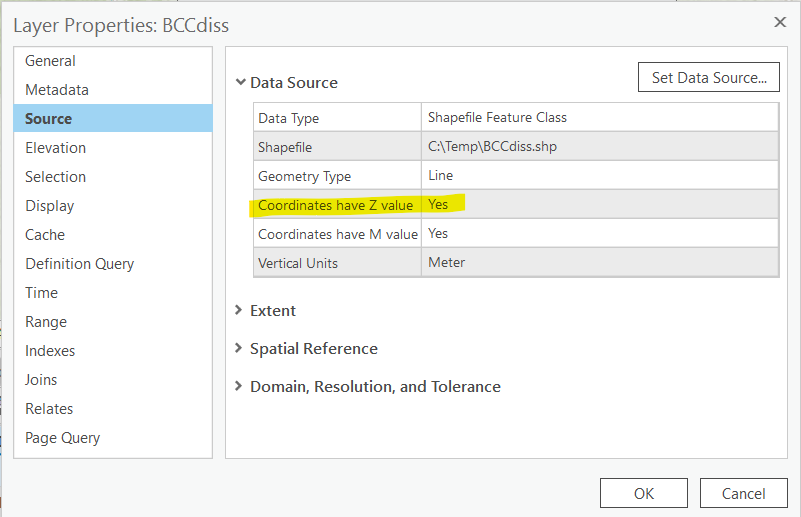
The exported shapefiles from Biotics 5 get created as 3D files (polygonZ) files. This could be problematic if trying to merge these files w/ other non Z value feature class/shapefiles. To determine if this is the case, open the layers Properties and navigate to the Source tab which indicates Coordinates have Z values: Yes.
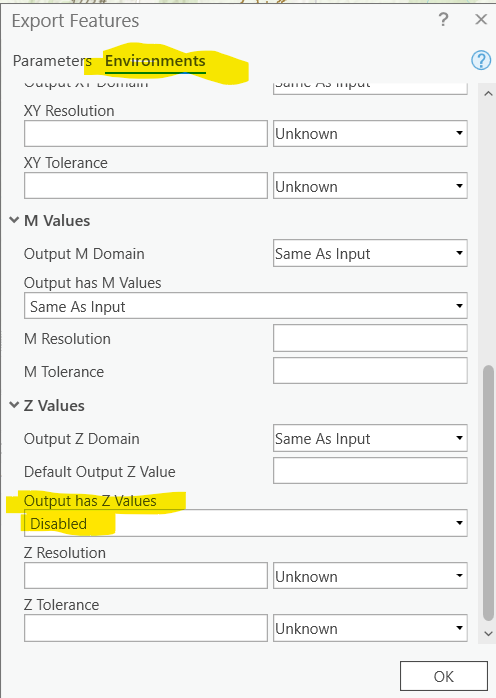
To fix this in ArcGIS Pro, use Export Features and alter the Environments to DISABLE Z and M values.This creates a 'clean' copy of the feature class/shapefile without the values.
Provided by VNHP