Below are instructions for filling out the Spreadsheet for converting your custom tables/views/objects to Postgres: Instructions are provided for each spreadsheet in the folder for your program. Some don't need any action and some do require actions.
- You do not need to delete any tables/views that you do not intend to migrate. Just put a "N" in the column.
- Please make sure that there are no blanks in the "Migrate" columns for those sheets that need action. There should either be a Y or N for every row.
- We will send you another set of spreadsheets prior to your conversion that will capture any changes that you have made since this export. You should be able to copy/paste most of your values except for any new rows that are added.
- If you have a NatureServe SharePoint account, you should be able to log in and go to this folder, find your program within that folder and then edit the CSV's directly in SharePoint.
 Extensible Tables and Views Exports
 - If you do not have access to NatureServe SharePoint, you can easily request access. If you are on the Biotics POC list (which you all are) you should have gotten an invitation to join our tenant as a Guest. If you didn't do that or you never received access, please fill out this form and we will send another link for you to create an account. This will be useful going forward as we will need to do this again closer to conversion. Once you have access, you should be able to access the folder via this link:
 Extensible Tables and Views Exports and find your program and edit the spreadsheets directly in SharePoint.
 - If your organization does not allow access to Microsoft Office 365 or you don't believe you will be able to have a guest account, you can download the spreadsheets, open them as an Excel File, edit them, re-save them as a CSV, and then upload them and overwrite the existing file in SharePoint. It is important that these are named the same as the files that are currently in there or the conversion will not work properly. It may not be as big of an issue during this initial run, but it will be for the final production push, so it's best to make sure things are working properly now.
Spreadsheets
- Custom Date Columns: This is a list of your custom date columns in your Biotics 5 database that will be converted. This is for your information only. No action is needed.
- Custom Foreign Keys: This is a list of your extensible tables and their relationships to other tables. This is for your information only. No action is needed.
- Custom Functions: This is a list of custom functions in your database. Action Needed: Please indicate in the Migrate column a "Y" for migrate or "N" do not migrate. Please make sure every row has either Y or N.
- We have found the following functions are obsolete and should have a migration decision of 'N' if they are listed in your spreadsheet. You may also have view or procedures that rely on these obsolete functions.
- CHECK_FOR_TABLE_CONSTRAINTS
- XLATE
- GETNEXTSEQ (no longer needed in Postgres because of the way it handles IDENTITY columns)
- LOOKUP
Custom Numeric Columns: Numeric data types are changing during the migration process and a decision must be made whether to convert each column to either an integer or a decimal column in the Postgres database. This spreadsheet indicates how data will be converted, and has been initially populated by examining the data stored in your Biotics 5 database. If a decimal value was found, the "Decimal Values Found" column has been set to Y and Data_Type has been set to DOUBLE. If the data for any numeric column has been misinterpreted, change the Data_Type to either BIGINT (integer) or DOUBLE (decimal) as appropriate. If you discover data mistakes in which your Biotics 5 database contains a decimal value stored within a column which should only contain integers (such as a column representing a year), you will need to change the Data_Type column to BIGINT and also fix the data within Biotics 5. If your Biotics 5 data for a column does not currently contain any decimal values but you would like to allow decimal values to be entered in Biotics 6, change the Data_Type column value to DOUBLE.
- Data_Type = BIGINT indicates that the column will be an integer field in Biotics 6; the Biotics 5 data must not contain decimal values.
- Data_Type = DOUBLE indicates that the column will be a decimal field in Biotics
- Custom Procedures: This is a list of custom procedures in your database. Action Needed: Please indicate in the Migrate column a "Y" for migrate or "N" do not migrate. Please make sure every row has either Y or N.
- Note that there are a handful of custom procedures such as "QUERY CORRUPTED RECORDS", "DB_INSPECTOR", "FIX_EO_NUM, CHECK_TABLE_CONSTRAINTS, " that may have one time been used either in Biotics 4 or Biotics 5 to fix a particular issue. Our team has determined that these are no longer needed by the application or it has been replaced with something else in PostGres that will be automatically converted. You can check to see if there are any dependencies in the "Custom Objects Summary" doc found in your folder to make sure nothing is relying on it. Most of these can be safely deferred to not migrate unless your program has specifically created custom procedures for your program.
- Custom Tables: This is a list of custom tables in your database. Action Needed: Please indicate in the Migrate column a "Y" for migrate or "N" do not migrate. Please make sure every row has either Y or N. The other columns in this sheet are for your information. The only column needing action is the "Migrate" column.
- Note that your spreadsheet might contain a number of tables starting with "MDRT". These are related to Oracle spatial tables and can safely be marked "N" as they do not need to be migrated.
- We have also found the following table may NOT show up on your spreadsheets and are considered obsolete as they were once used by NatureServe but are not longer used or maintained in Central Biotics, but your program may be still using these. They may show up when you query for for Extensible Table registrations if you were using these tables. If your program uses these still, you can add a new row to your Custom Tables spreadsheet and put Migrate = "Y" if you would like to migrate these. You can then include these in questions 6 and 7 in your Custom Objects Ready to Convert form so we know you would like to add these tables to your instance.
- D_ESTIMATE_PRECISION
- PREVIOUS_POP_SIZE
- CONTACT
- D_PREV_EST_AVAILABLE
- Custom Views: This is a list of all of the custom views in your database. Action Needed: The first thing you should do is take a look and see if there are views in here you do not plan to migrate and mark those with "N". Then look at the remaining views. If there are views with Valid = "N" then you will need to look at that view and determine why it is not valid and fix it prior to migration. If it fails, it will not be migrated. If you are not migrating it, no need to fix it. Similarly, if the "Contains Problematic Outer Join" column contains a "Y", then you need to fix that outer join prior to conversion. There are Help Desk Solutions that can help fix these. After conversion there may need further refinement needed to get them to properly work in PostGres but they need to be valid in Oracle prior to conversion.
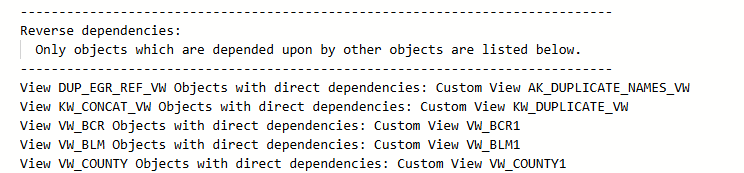
- CustomObjectsSummary.txt: This is an output that helps determine whether the custom objects in your instance have any dependencies. If you look at this file it will help with the following:
- The first section will tell you if there are objects that cannot be migrated due to obsolete objects. If you were to want to migrate that object, you would have to fix the dependency.
- The second section is primarily for our development team. It tells us the order in which things need to be converted in order to satisfy dependencies. In general, those things at the beginning of the list may need to be converted before the items that come after it in order to respect the dependencies.
- You can see which views depend on other views/tables. This is important when deciding whether or not to convert a table or view. You can do a "find/replace" to search for particular views/tables to find out if they have dependencies. For example, you would not want to drop a view if another view depends on it that you want to retain.

- The final section is Reverse Dependencies. This lists ONLY objects that are depended on by other objects. You would most likely want to keep these unless you don't need any of the tables/views that are dependent upon each other