
Once programs have submitted the Custom Objects Ready to Convert Form, we will run a check on your database based on the answers you provided in your spreadsheet and provide you with a report that lists any potential problems that were found, as well as re-create your CSVs again, retaining your original Y/N values. The updated CSVs will not include any objects dropped from your database since the prior CSV was generated, and will include new objects which have been created since then. A link to the folder containing the CSV files can be found here: Extensible Tables and Views Exports
Use the guidance below to address these potential issues. Once you have addressed the issues, fill out the Custom Objects Ready to Convert Form again, and we will re-run the CSVs and report again. This process will continue until no issues are found. We encourage programs to complete their CSVs and submit the Custom Objects Ready to Convert Form as soon as possible so we can work through this well in advance of your conversion.
Migration Analysis Troubleshooting
Duplicate table/view/function/procedure names
This is reporting one of two situations which the client will need to investigate themselves:
- Two objects share the same name, differing only by case
- Two objects share the same name but exist in different schemas; this is typically a table that matches the same name as a table within the deleted schema
Resolution: Rename or drop one of the underlying Oracle objects involved in this situation. All object names in the database must be totally unique (ignoring case) in order for the migration analysis to be reliable.
Missing migration decision
This could be because the program failed to make a decision or because the object has been created in their DB since the time that their original CSVs were generated.
Resolution: A decision of Y or N must be set in the CSV's Migrate column.
Unexpected migration decision
A value other than Y/N was found. Definitive decisions must be made — “soft” decisions such as N? are not allowed.
Resolution: A decision of Y or N must be set in the CSV's Migrate column.
Non-migrated table referenced by extensible table registration
The table is referenced by dynamic_object.table_name, which means it is registered as an extensible table.
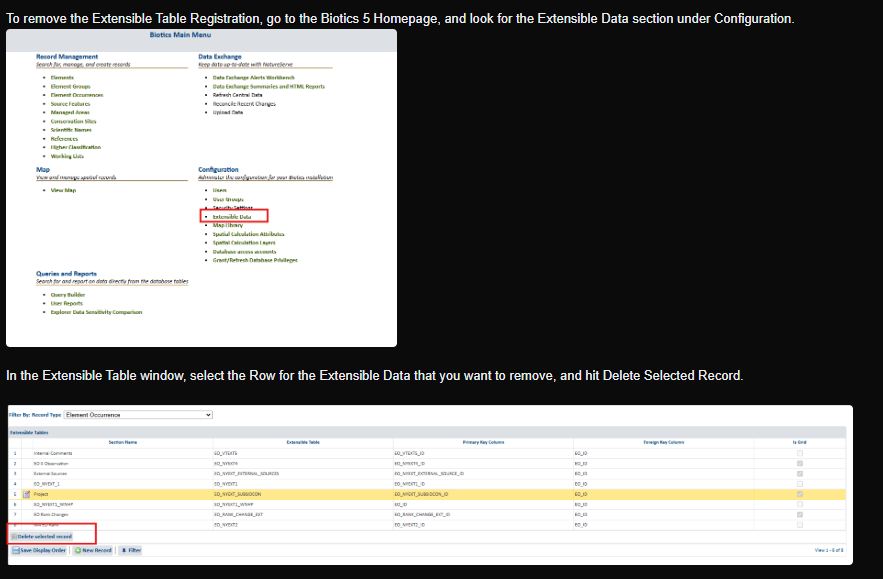
Resolution: TThe table must either be migrated (set Migrate=Y in the CSV file) or removed from their extensible table’s registration data within Biotics 5.
Non-migrated table referenced by extensible domain table registration
The report will indicate if the table is referenced by dynamic_attribute.domain_table which means it is registered as an extensible domain table)/
Resolution: The table must either be migrated (set Migrate=Y in the CSV file) or removed from their extensible table’s registration data within Biotics 5.
Note that if you decide not to migrate a table used as a domain table, you should either remove the database column which is a foreign key reference to the table or ensure it allows null values, as column values for new rows will not be populated in Biotics 6.
This error has already been seen in some converted systems where Source Feature records will not open due to one of the rows in Source Feature Extensible Configuration is referencing a domain table that was not migrated. This has been linked to obsolete domain tables not being migrated but also may not show up in your custom tables. Make sure to do Step 4 in the Conversion Schedule and Program Readiness solution. Should you convert and get an error relating to this, see this article Error When Opening Source Feature Record that details how to fix it
Foreign keys referencing tables that are not being migrated
Resolution — three possible solutions:
- Don't migrate the table which refers to the missing table — set Migrate=N in the CSV file.
- Drop the foreign key reference (and possibly the column) from the Biotics 5 database.
- Migrate the referenced table — set Migrate=Y in the CSV for the referenced table, if it is a custom table which already exists in the CSV file.
If this is reported due to a reference to an obsolete Biotics 5 table that is not being migrated, the obsolete table can be migrated as a custom table if desired by adding a new row to custom_tables.csv for the obsolete table and setting Migrate=Y. No other information needs to be entered, although you can note this in your Custom Objects Ready to Convert form, Questions 6 and 7. Some common examples that have been showing up are the following tables:
- D_ESTIMATE_PRECISION
- D_PREV_EST_AVAILABLE
NatureServe will need to regenerate the CSVs again so that custom_numeric_fields.csv and custom_date_fields.csv contain rows for the obsolete table, which should subsequently be reviewed by the client for accuracy.
Numeric column typed as BIGINT despite containing decimal values
A numeric column will be converted as a BIGINT data type, but the current values include decimal values. The decimal component will be truncated during migration, not rounded.
Resolution: This isn't necessarily a blocker, but is an unusual situation which should be confirmed.
- The datatype can be changed to DOUBLE in the client's CSV if they decide that is a more appropriate data type.
- Alternatively, they can fix their data so this situation no longer occurs if the values should not contain decimal values.
They can use a query similar to the following to find rows containing decimal values:
select * from some_table where mod(some_column, 1) != 0;Invalid view selected for migration
A view which is not currently valid within Oracle has been selected for migration. The view cannot be processed by the AWS Schema Conversion Tool. This will cause failures during conversion for any other objects that depend upon the view.
Resolution: The view should either be fixed within Oracle or excluded from conversion by setting Migrate=N in the CSV.
Objects that cannot be migrated due to missing dependencies
Resolution — a few possible solutions:
- Do not migrate the object — set Migrate=N in the CSV.
- Migrate the dependency which has not been selected for migration — set Migrate=Y for the referenced object in the appropriate CSV.
- Alter the object in Oracle to no longer depend upon the missing dependency.
Views containing problematic outer join — ( + )
Oracle supports the following syntax for left outer joins:
select ... from foo, bar, baz
where foo.id = bar.id and bar.id(+)=baz.id;
However, if (+) is instead written as ( + ), the conversion tool encounters problems, and will stop processing the where clause at the location where this symbol occurs. It doesn't throw any errors, and it is entirely possible that it will produce a Postgres view that is syntactically valid but logically wrong — a mistake that might not be caught until much later.
Resolution: The client should modify their Oracle view to instead use (+).