
1. Draft Biotics rollout schedule (feedback needed by September 1)
Attached is our draft rollout schedule for the Biotics 6 conversion. Please review it and share any feedback or scheduling conflicts with us by September 1.
We anticipate your Biotics instance being down for one full day for the conversion, but if a programs conversion is especially complicated or has more data that usual, it is possible it could stretch to a second day. A few programs are labeled DX_dependent and have less flexibility than the others, though there may be some room to shift those slightly if needed. Data exchange (DX) timing matters here: Programs with a data exchange scheduled before Central Biotics converts in late October must stay in Biotics 5 until after their exchange, so their conversions have been scheduled no sooner than November. Once Central converts to Biotics 6 in late October, all future data exchanges will be performed in Postgres. This means that any program that hasn't converted before Central converts, won't be able to complete a data exchange until they also convert to Biotics 6. I also tried to take into consideration program requests, but I realize the timeline has shifted some so if there are dates that absolutely will not work for you, please let me know.
2. Resolve duplicate and missing email addresses in your user accounts (deadline: September 8, 2026)
One of the things we're implementing with the Biotics 6 rollout is Multi-Factor Authentication (MFA). This will be mandatory for all Biotics instances. Users will log into Biotics 6 using the email address which is associated with their Biotics account. It's important that this field is filled in for every active user who will be migrated, and that there are no duplicate email addresses across your users.
There's a view called security_users_vw available in Query Builder that will help you quickly identify which users are missing an email address and where duplicates exist. Run the following query to check your program:
sql:
select * from security_users_vw
Please review the results and update any missing or duplicate email addresses by September 8. Any duplicates not resolved by that date will automatically have their email address cleared in the Biotics 5 release scheduled for September 9 — meaning that such users will need a new email address added to their account in order to log into Biotics 6. Email addresses can either be added in Biotics 5 before migration or in Biotics 6 after migration.
This is also a good time to make sure any users who are no longer part of your program are marked as Inactive.
A couple other things worth knowing:
- Placeholder values like "x" or "xx" used as email stand-ins will also be cleared.
- Security group email addresses will be cleared as well, since groups will no longer support email addresses going forward.
3. Fill out your conversion CSVs - Please do this asap and well in advance of your conversion data.
Your conversion CSVs need to be completed before your database converts. Instructions for filling these out are here: https://bioticssupport.natureserve.org/support/solutions/articles/265845-filling-out-conversion-spreadsheets-for-extensible-custom-objects
Once you have filled out your conversion spreadsheets, fill out the "Custom Objects Ready to Convert Form" and we will run a pre-conversion check on your database that takes into consideration the information you filled out on your spreadsheets. This creates new versions of your spreadsheets with your previous decisions still reflected and also provides a report on potential issues. We ask that you use the information in the Addressing Pre-Migration Issues found in CSV's solution to work through these issues. Once you have addressed them, we ask you to submit a new Custom Objects Ready to Convert form and we will run this again. This cycle will continue until the report does not report any potential conflicts or errors.
Note: the guidance for custom_date_columns.csv has been updated — you can now optionally migrate Oracle DATE columns as Postgres TIMESTAMP WITH TIME ZONE columns, for custom tables that aren't registered as extensible tables.
If you have custom functions, procedures, or views that you've identified as needing to migrate to Postgres, we will provide you with the extracted Oracle source code for those objects, along with the AWS Schema Conversion Tool (SCT) results for each one — including any that didn't convert successfully.
If you've made structural edits to any custom objects within your database since receiving your original custom objects dependency analysis, let us know and we can run an updated one for you — the newer version also includes tables in the Reverse Dependencies section, which the original didn't have. One thing to be aware of: rerunning this analysis regenerates your CSV files from scratch, so if you've already started filling out your originals, we'd rather not overwrite your progress. Instead, we'll send you a fresh, updated copy alongside your original files, and you can carry over any decisions you've already made into the new version.
4. Clean up extensible table registrations (action needed before your conversion)
Once you've selected which tables you're migrating, please modify your Biotics extensible table registrations to only reference tables that will actually be migrated. Attached are two queries to help you check this:
- The first identifies extensible sections that reference tables not being migrated.
- The second identifies dynamic fields that reference domain tables which won't exist in Biotics 6 as either extensible tables or standard domain tables.
If either query returns rows, you will most likely need to remove those entries from your extensible table registrations. If this isn't cleaned up by the time your database converts, you won't be able to view the affected record types in Biotics 6 until it's corrected. The exception is if your program still refers to old Biotics 5 Domain tables somewhere else in the application. If this is the case, make sure to note this table in your Custom Objects Ready to Convert Form, Question 6 and 7 and we will convert it for you. You can also add the table as a new row on your Custom Tables spreadsheet and mark Migrate = "Y". This is will also allow the migration of these tables. Some common ones we have seen are D_PREV_EST_AVAILABLE and D_ESTIMATE_PRECISION .
Also — if you're migrating a custom table that refers to a custom Biotics 5 domain table that is not being migrated, you'll need to either drop the referring column or remove the foreign key constraint on that column. If you keep the column, it will need to allow null values.
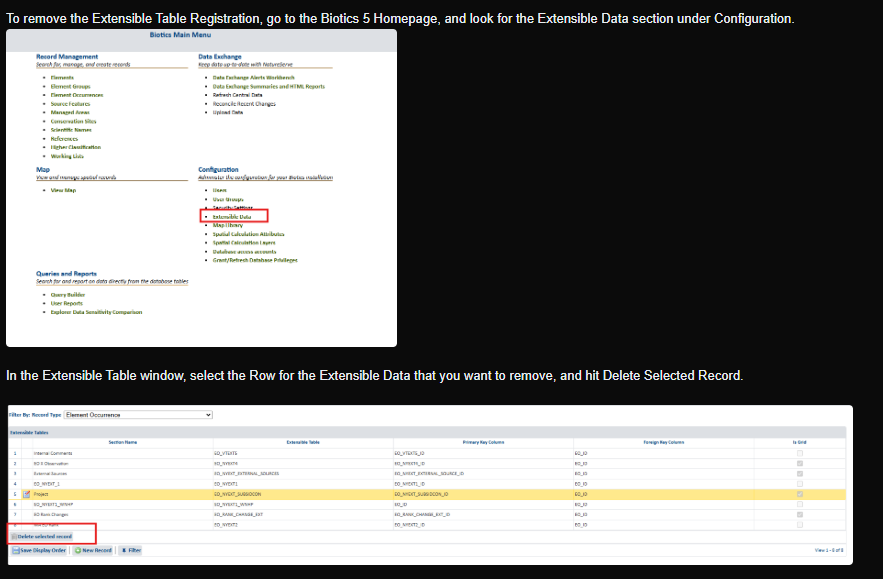
Instructions on removing Extensible Table Registrations:
5. A note on Explorer and Explorer Pro data refresh
Once Central Biotics converts to Biotics 6 in October, and until member program databases have converted and our developers have time to update the related functionality (likely January or February 2027), data will not be refreshed on NatureServe Explorer or Explorer Pro. The Explorer websites will remain functional during this window — only our ability to update them with new data will be affected.
If we're able to address the Explorer Pro refresh process ahead of the conversion timeframe, we will let programs know.
6. Review converted custom objects after conversion
Once your database has been converted to Postgres, please have someone familiar with your custom database objects (functions, procedures, views) review each one carefully. The conversion process does a decent job overall, but a couple of specific things are known to cause issues:
- Dynamic SQL will not convert correctly. If any of your custom objects use the delimlist function (or otherwise build and run SQL dynamically), this logic will not be converted and is unlikely to work as-is. It will need to be fixed manually. See here for guidance on replacing delimlist in Biotics 6: https://bioticssupport.natureserve.org/support/solutions/articles/266016-delimlist-replacement-in-b6
- Watch for STRICT causing new errors. Functions that populate a variable from a query may come through with STRICT added, which will throw an exception if the query returns zero rows or more than one row. If a function starts erroring out after conversion where it worked fine before, this is a possible cause. It can be resolved by either adding an exception block to handle no_data_found/too_many_rows conditions, or removing STRICT (which will set the variable to null if no rows are found, or use the first row if multiple are returned).
- Custom triggers will not be converted.
It might be best to consider the automated conversion results as a good starting point for your postgres implementations instead of as polished, final implementations.
7. Managing custom objects post-conversion
It is highly recommended that you copy all the scripts which we will provide into your own git repository. If future changes are needed for your custom objects, maintain the scripts so that they always contain the most current definitions.
In particular, there is a script named “addDbObjects.sql” which recreates all the functions, views, and procedures in the order that is required due to object dependencies. We have found this script to be extremely useful when modifying objects in a way that is not backwards compatible. For example, in order to drop a column or insert a new column into the middle of a view, you must first drop all objects which depend upon the view and recreate them after the view has been modified. Similar workflows are needed to add or remove parameters from a function or procedure. This script makes it very easy to recreate all code-based extensible objects when introducing such changes.
We will be discussing all of this in detail on Thursday, August 20th at 2:00 pm in our Biotics 6 Rollout Meeting. If you are unable to attend, I will make sure to record it and send it along after.
As always, if your team runs into issues you're unable to resolve, please submit a ticket to the help desk.
Filling out Conversion Spreadsheets
Extensible Tables and Views Exports
Biotics 6 Conversion Readiness – Fill out form
Custom Objects Ready to Convert – Fill out form